

Docker changed how I think about deploying software. Instead of wrestling with “works on my machine” headaches, it bundles everything an application needs into containers. These isolated units share the host OS, so they launch fast without the bloat of full virtual machines.
I remember my first time seeing a container spin up in seconds – it felt like magic compared to waiting for VMs to boot. Images, containers, and registries form a simple ecosystem that keeps environments identical from your laptop to production servers.
The real question isn’t what containers are, but why they matter so much now. Organizations need to ship faster and scale smoothly.
Docker delivers that consistency developers crave and operations teams need.
What Are Containers and How Do They Differ From Virtual Machines?
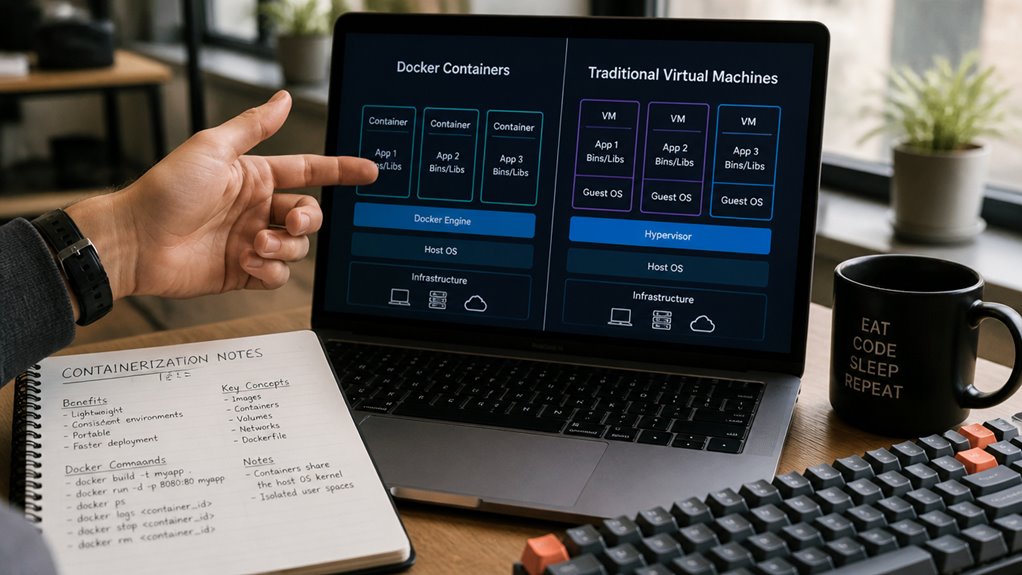
Containers and virtual machines both package applications with their dependencies, but they operate through different methods. Virtual machines include an entire operating system, requiring significant storage space and memory resources. Docker containers, by contrast, share the host operating system kernel, making them lightweight and faster to start.
A virtual machine running Windows or Linux needs gigabytes of space. A Docker container typically uses only megabytes. This efficiency allows developers to run multiple containers simultaneously on a single machine, whereas virtual machines are more resource-intensive.
Containers provide faster deployment times, easier scaling, and simpler management. Virtual machines offer stronger isolation between applications. Docker containers work well for microservices architectures, while virtual machines suit scenarios requiring complete operating system separation and legacy application support.
Key Benefits of Docker for Development and Deployment
Efficiency stands as a primary advantage when developers adopt Docker for their projects. Docker containers streamline workflows by packaging applications with all necessary dependencies, reducing setup time and configuration errors across different environments.
Consistency improves considerably through Docker’s standardized containerization approach. Development teams work with identical environments from local machines to production servers, eliminating the works on my machine problem.
Scalability becomes manageable and cost-effective. Organizations deploy multiple container instances rapidly, distributing workloads across servers without extensive infrastructure modifications.
Additional benefits include:
Faster deployment cycles, reducing time-to-market for software updates
Simplified maintenance through isolated application environments
Reduced resource consumption compared to virtual machines
Enhanced security via containerized application separation
These advantages make Docker a practical choice for teams prioritizing operational efficiency and development speed.
Real-World Docker Use Cases That Prove Its Value
Organizations across industries have implemented Docker to solve specific operational challenges and improve their software delivery processes. Tech companies like Netflix and Spotify use Docker to manage microservices, breaking large applications into smaller, independent components that scale easily. Financial institutions deploy containerized applications for secure, isolated environments that meet regulatory requirements.
E-commerce platforms like Airbnb utilize Docker to guarantee consistent performance across global servers, reducing deployment time from hours to minutes. Healthcare providers run Docker containers for HIPAA-compliant applications with predictable resource usage. Development teams benefit from standardized environments where code runs identically on laptops, testing servers, and production systems.
These implementations demonstrate Docker’s practical value in reducing infrastructure costs, accelerating release cycles, and minimizing deployment errors across diverse business sectors.
How Docker Creates Isolated Application Environments
Docker achieves application isolation through a layered architecture that separates each container from the host system and other containers. Each container operates independently with its own file system, network interface, and process space. This isolation prevents conflicts when multiple applications run on the same machine.
Containers use namespaces to isolate system resources, including process IDs, network connections, and user accounts. Cgroups limit resource allocation, controlling CPU, memory, and disk usage per container. For example, a database container cannot consume all available memory, affecting a web server container running alongside it.
This separation guarantees that dependencies for one application, such as specific library versions, remain contained within that application’s environment. Other containers maintain their own dependencies without interference or version conflicts.
The Three Things Docker Uses to Work: Images, Containers, and Registries
Three core components work together to make Docker function: images, containers, and registries.
Images are blueprints containing application code, libraries, and dependencies needed to run software. They remain static and unchanged until rebuilt.
Containers are running instances created from images, operating as isolated environments where applications execute. Each container runs independently, preventing conflicts between different software versions or configurations.
Registries are centralized storage systems that hold and distribute images across teams and machines. Docker Hub serves as the default public registry, though organizations can maintain private registries. Together, these three elements enable developers to package applications consistently, share them reliably, and deploy them anywhere Docker is installed.
Your First Docker Project: A Hands-On Introduction
Now that the foundational concepts of images, containers, and registries have been established, learners can apply this knowledge to create their first Docker project. A practical starting point involves pulling a simple image from Docker Hub, such as Nginx or Ubuntu, then running it as a container on a local machine.
This process requires basic terminal commands to download the image, verify its presence, and execute the container with appropriate port mappings. Beginners benefit from observing how the container operates independently from the host system, experiencing isolation firsthand.
Examining container logs and stopping running instances reinforces understanding of lifecycle management. This hands-on experience solidifies comprehension of how images, containers, and registries interconnect in real-world application, establishing confidence for more complex Docker projects ahead.
Frequently Asked Questions
What Are the System Requirements for Installing Docker on Different Operating Systems?
Docker requires 64-bit processors and virtualization support across platforms. Windows needs Windows 10 Pro or Server 2016+. macOS requires version 11+. Linux distributions need kernel 3.10+. All systems require adequate RAM and disk space allocation.
How Does Docker Pricing Work, and Are There Free Versions Available for Enterprises?
Docker’s pricing model operates as a tiered ecosystem where enterprises navigate multiple pathways. Free Community Edition serves as the foundation, while paid tiers—Docker Pro, Team, and Business—unlock advanced features and support options for growing organizations.
What Security Vulnerabilities Should Organizations Be Aware of When Using Docker?
Organizations should monitor container image vulnerabilities, implement runtime security policies, restrict host access, use minimal base images, and regularly patch dependencies. Additionally, they must enforce role-based access controls and scan images before deployment to mitigate security risks effectively.
How Do You Troubleshoot Common Docker Errors and Connectivity Issues Effectively?
One troubleshoots Docker errors by examining logs via `docker logs`, verifying network connectivity with `docker network inspect`, checking container status using `docker ps`, and reviewing configuration files. Restarting the Docker daemon and inspecting port mappings resolves most connectivity issues effectively.
What Is the Docker Networking Model, and How Do Containers Communicate With Each Other?
Containers flow through interconnected pathways like ships traversing separate channels. Docker’s networking model enables container communication through bridge networks, overlay networks, and host networks. Containers connect via IP addresses and DNS, allowing seamless inter-container dialogue and external connectivity.
Conclusion
Docker functions as a foundational tool, weaving applications and dependencies into portable containers like threads in fabric. This platform standardizes deployment across systems, eliminates environment inconsistencies, and streamlines workflows for developers and operations teams. Through images, containers, and registries, Docker constructs isolated environments where applications operate independently. Organizations adopting Docker experience reduced deployment times, improved scalability, and consistent performance—essential capabilities in modern software development landscapes.