

I’ve always found the container versus VM debate fascinating.
Containers feel nimble—sharing the host’s kernel keeps them lean and lightning-fast. VMs, meanwhile, are the heavyweights, emulating entire systems with stubborn reliability.
Choosing between them isn’t straightforward. Sometimes I need that blistering speed for microservices. Other times, only a VM’s fortress-like isolation will do for legacy applications.
Ultimately, it comes down to context. What are you running? What’s at stake? The “right” answer shifts with every project.
How Containers and Virtual Machines Work
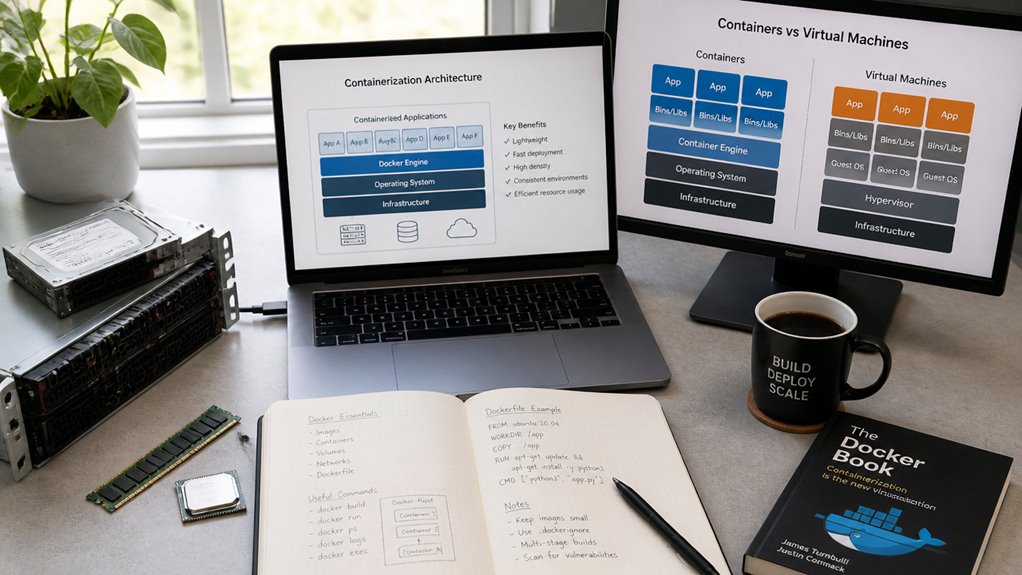
Because both containers and virtual machines serve similar purposes but operate differently, understanding their mechanics proves essential for deployment decisions. Virtual machines emulate entire computers, running their own operating systems and applications on top of a hypervisor, a software layer managing hardware resources. Docker containers, by contrast, package only applications and their dependencies, sharing the host operating system kernel with other containers.
This fundamental difference creates distinct resource requirements. Virtual machines consume significant memory and storage, since each runs a complete OS. Containers use far fewer resources, starting in seconds rather than minutes.
For example, a server might run dozens of containers but only several virtual machines simultaneously. Both approaches isolate applications, yet containers provide lighter-weight isolation through containerization technology rather than full OS virtualization.
Containers vs. VMs: Resource Efficiency Compared
Most organizations find containers markedly more efficient than virtual machines when measuring CPU, memory, and storage consumption. Containers share the host operating system kernel, requiring minimal overhead, while virtual machines run complete operating systems independently. A single server can run dozens of containers but only a handful of virtual machines.
Memory usage demonstrates this difference clearly. Containers typically consume 50-100 MB each, whereas virtual machines demand 1-4 GB per instance. Storage requirements follow similar patterns, with containers using considerably less disk space.
CPU efficiency also favors containers. They allocate processing resources more directly without the virtualization layer that virtual machines require. Organizations deploying containerized applications report faster startup times and improved resource utilization across infrastructure.
Speed Comparison: Containers or Virtual Machines
When evaluating deployment speed, containers demonstrate considerable advantages over virtual machines across multiple performance metrics. Containers start in seconds, while VMs typically require minutes to boot operating systems and load applications. This speed difference stems from containers sharing the host OS kernel, eliminating redundant system initialization processes.
Docker containers, for example, launch almost instantaneously compared to hypervisor-based VMs like VMware or VirtualBox. Scaling applications horizontally becomes faster with containers, allowing teams to spin up multiple instances rapidly during traffic spikes. VMs demand more computational overhead, including full OS boot sequences for each instance.
Development and testing cycles accelerate considerably with containers, reducing time between code commits and production deployment. Teams experiencing time-critical updates benefit substantially from container speed advantages. However, VMs maintain security isolation benefits that some enterprises prioritize over deployment velocity.
Security: Isolation, Attack Surface, and Risk
Isolation represents a fundamental distinction between containers and virtual machines, with significant implications for enterprise security strategies. Virtual machines isolate applications through separate operating systems, creating stronger barriers against unauthorized access. Containers share a host kernel, which reduces isolation but improves efficiency.
The attack surface differs considerably. Virtual machines present larger targets due to multiple operating systems requiring patches and updates. Containers concentrate vulnerabilities in the shared kernel, making targeted attacks potentially more impactful across multiple containers simultaneously.
Risk assessment requires evaluating specific deployment contexts. Financial institutions often prefer virtual machines for maximum isolation of sensitive transactions. Technology companies frequently choose containers for development environments where isolation requirements are less stringent. Organizations must balance security requirements against performance needs and infrastructure costs when selecting deployment methods.
Scalability and Density: How Many Apps Can You Run?
Because containers require fewer system resources than virtual machines, organizations can run considerably more applications on the same physical hardware. A single server might host dozens of containers, while supporting only a handful of virtual machines. Containers consume minimal memory, disk space, and CPU resources compared to VMs, which each need a full operating system.
This density advantage translates to cost savings and efficiency gains. A company running microservices can deploy numerous containerized applications across fewer servers. Virtual machines, by contrast, demand substantial overhead from their individual operating systems.
For organizations handling high application volumes, containers enable better resource utilization. The practical outcome means lower infrastructure expenses, reduced power consumption, and simplified management of large application portfolios across consolidated hardware environments.
Choose Containers If Your Team Needs Speed and Portability
Beyond the resource efficiency gains discussed previously, containers offer another distinct advantage: rapid deployment and consistent operation across different environments. A team can build a containerized application once, then run it on a developer’s laptop, a testing server, or production infrastructure without modifications. This portability eliminates the common problem where software works on one machine but fails on another due to different configurations.
Docker containers exemplify this capability, allowing developers to package applications with their dependencies into standardized units. Deployment time drops from hours to minutes.
Teams moving to containers experience faster iteration cycles, quicker bug fixes, and reduced deployment friction. The consistency across environments means fewer surprises during production launches, ultimately supporting faster release schedules and more reliable software delivery.
Choose Virtual Machines If You Need Isolation and Legacy Support
While containers excel at speed and portability, virtual machines provide distinct advantages for organizations requiring strict isolation between applications and systems running legacy software. Virtual machines create complete, independent operating system environments, ensuring that problems in one system cannot affect others. This isolation proves critical in regulated industries like banking, healthcare, and finance, where security requirements demand separation between workloads.
Legacy applications present another key consideration. Older software, such as Windows Server 2003 systems or mainframe-dependent programs, often cannot run in containerized environments. Virtual machines accommodate these systems without modification, allowing organizations to maintain existing infrastructure while gradually modernizing. This capability makes VMs essential for enterprises with substantial investments in older technology that requires continued operation alongside newer applications.
Building a Decision Matrix: Questions to Ask Your Team
How can organizations systematically evaluate whether containers or virtual machines better suit their specific needs?
Teams should assess several key factors when making this decision. First, examine workload requirements, considering whether applications need full operating systems or lightweight environments. Second, evaluate infrastructure constraints, including available hardware, budget, and IT expertise. Third, analyze scalability needs, determining if the solution must handle rapid deployment or gradual expansion.
Organizations should also consider legacy application compatibility, security requirements, and team familiarity with each technology. Development speed matters too: containers typically accelerate deployment cycles, while virtual machines provide broader compatibility with older software.
Documenting answers to these questions creates a decision matrix, enabling teams to compare options objectively. This structured approach reduces guesswork and aligns technology choices with actual business requirements and operational capabilities.
Frequently Asked Questions
Can Containers and Virtual Machines Run Together in the Same Infrastructure?
Yes, containers and virtual machines can coexist within the same infrastructure. Organizations typically deploy containers on host operating systems or within virtual machines, allowing them to leverage both technologies’ distinct advantages simultaneously for ideal resource utilization and flexibility.
What Are the Licensing Costs Associated With Containers Versus Virtual Machines?
A company migrating from VMware virtual machines ($10,000 annually per server) to Docker containers (often free/open-source) typically reduces licensing expenses considerably. Container technologies generally cost less due to their lightweight nature and open-source availability, whereas virtual machines require proprietary software licensing fees.
How Difficult Is It to Migrate Existing Applications From VMS to Containers?
Migration difficulty varies greatly depending on application architecture. Monolithic applications require substantial refactoring, while microservices-based systems shift more smoothly. Organizations typically need containerization expertise, testing frameworks, and careful planning to successfully convert existing VM workloads.
Which Option Requires Less Specialized Knowledge for Initial Setup and Maintenance?
Like comparing a well-worn path to an intricate maze, virtual machines require less specialized expertise for initial setup and maintenance. Their straightforward installation processes and graphical interfaces appeal to administrators lacking deep technical knowledge, contrasting sharply with containerization’s steeper learning curve.
Are There Industry-Specific Recommendations for Choosing Containers Over Virtual Machines?
Yes, industry-specific recommendations favor containers in software development, DevOps, and microservices architectures where rapid deployment and scalability are critical. Virtual machines remain preferred in enterprises requiring strict isolation, legacy system support, or diverse operating system environments.
Conclusion
Like two tools serving different purposes, containers and virtual machines each address distinct organizational needs. Containers excel in speed, efficiency, and modern microservices deployments. Virtual machines provide robust isolation and legacy system support. Teams must evaluate their workload requirements, infrastructure constraints, and security considerations to determine the appropriate technology. Neither solution universally dominates; rather, many organizations leverage both strategically within their deployment architecture.